

A B2B sales deck structure your team can build on
Plan your sales deck around buyer questions, useful evidence, and a clear next step. Includes a copyable slide worksheet and a live-versus-follow-up example.
 Words by Spring Studio
TL;DR
- Name the buyer, intended use, and decision before choosing slide layouts.
- Give each slide a point, appropriate evidence, and visible limits where facts remain unverified.
- Keep the live and follow-up versions consistent, moving necessary presenter context into the material.
A useful B2B sales deck structure starts with the buyer, the decision you want to support, and the evidence you can show. Map those before choosing slide layouts. Then give each part a clear job, from explaining a relevant problem to agreeing a practical next step.
Use this planning method with your marketing, sales, and design teams. The worked example uses a fictional support-routing product.
Name the buyer, meeting, and decision
Write one sentence about the situation: “We are presenting to a support operations lead who wants to understand how unassigned requests would be handled.” Add the decision the conversation should support. For example, the lead may be deciding whether to arrange a workflow review with the people who would use the product.
Keep that decision within reach of what the deck can establish. A concept diagram can explain an intended workflow. It cannot demonstrate that the product currently supports it or that the workflow will improve a business result.
This guide concerns a buyer-facing sales presentation. An investor pitch supports a different decision about investing in the company. Start from the intended reader and decision even when the two decks share some background or brand assets.
Also agree how the deck will be used. Will someone present it in a meeting, forward it afterward, or send it to a new reader without an introduction? Record those uses before asking the designer to remove or add detail.
Build a flexible content map
List the questions this buyer still needs answered. Then map the content that could help answer them. The table below is a set of possible content jobs, not a required sequence. Remove what the audience already understands and bring an unresolved question forward when the conversation needs it.
Swipe or scroll to compare the columns.
| Content job | Question it can address | Input to prepare |
|---|---|---|
| Shared situation | Which part of our work are we discussing? | A specific workflow or concern agreed with the buyer. |
| Relevant product behavior | What would happen in that workflow? | An accurate walkthrough, with concepts labeled and limitations visible. |
| Evidence and limits | What supports this claim, and what remains unknown? | The source, scope, permission to use it, and any unanswered questions. |
| Practical adoption questions | What would our team need to check? | Known requirements and open questions about roles, setup, or operating the workflow. |
| Next decision | What can we reasonably decide from here? | A clear proposed action, who should be involved, and what they will review. |
A content job can take more than one slide, and a simple slide can answer more than one closely related question. If a slide combines unrelated decisions, separate the ideas before designing a more elaborate layout. Treat the map as a working document that sales and marketing can question together.
Plan one slide before drawing it
Take one question from the map and write the point the slide needs to make. Then separate the point from the evidence you have. In our fictional example, the buyer asks who reviews an unassigned request. The proposed slide point is that unassigned requests enter a shared queue. That only answers part of the question: someone still needs to define who reviews the queue and how often.
A worked slide plan
Buyer and intended use: A support operations lead, in a live meeting and a follow-up deck. Decision this material supports: Whether to arrange a workflow review with the people who would use the product. Buyer question: Who reviews an unassigned request? Slide point: Unassigned requests enter a shared queue. Evidence available: A concept walkthrough; the behavior is unverified. Visual treatment: A simple flow labeled Request → Queue → Reviewer, with a visible concept label.
Presenter context: Explain that a reviewer would check the queue and assign a request to an owner, then ask who would take that role and how often. Read-alone context: Put that explanation and the unresolved question in the follow-up material. Evidence owner and review trigger: The person responsible for product accuracy must verify the behavior before it is described as available. Recheck the slide when that behavior changes.
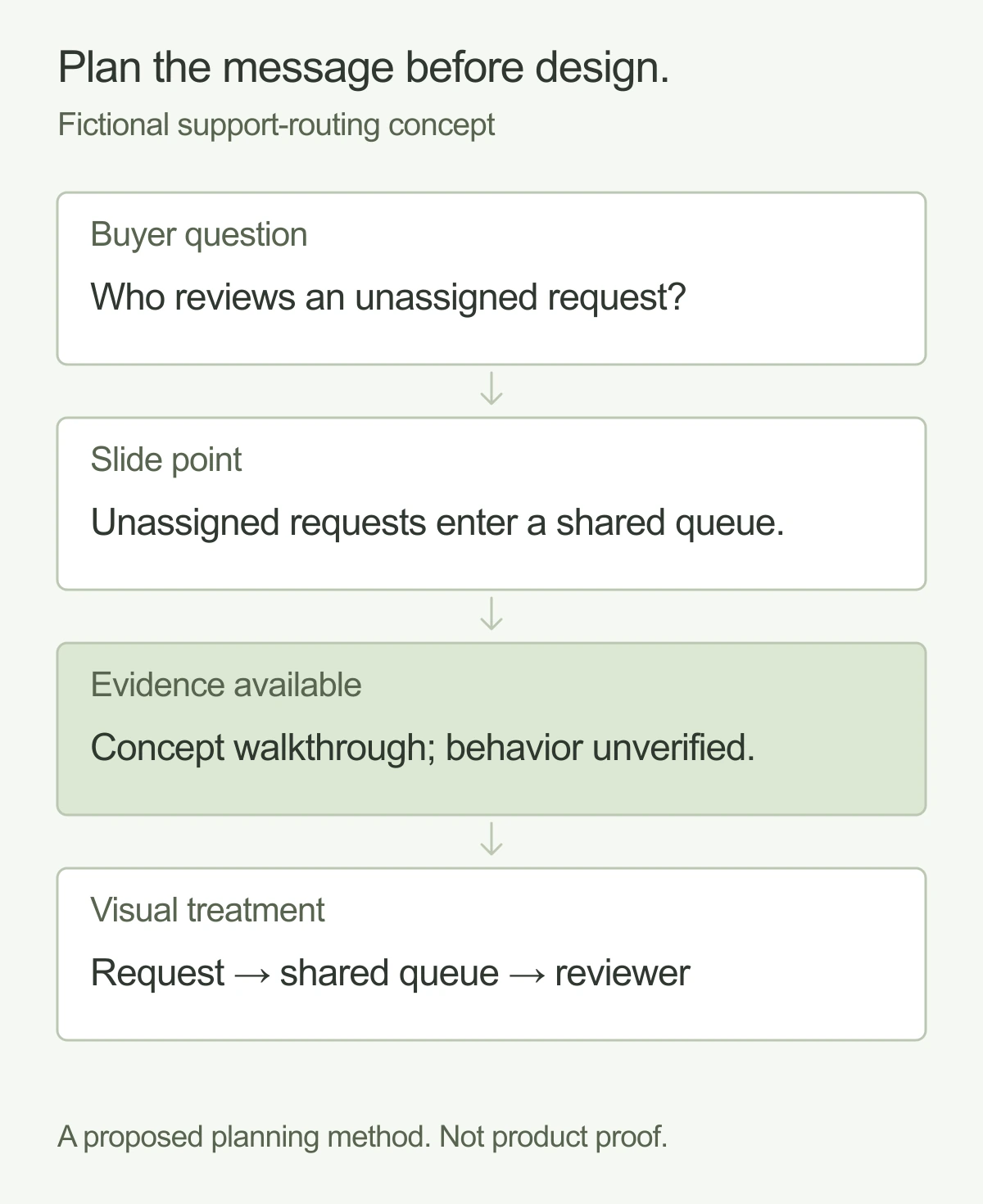
When evidence is missing, name the gap and assign the check. Do not substitute an attractive chart, an invented customer quote, or a broad claim such as “no request gets missed.” If the concept itself is the subject of the conversation, label it clearly and keep the discussion about what needs to be tested or confirmed.
Copy the slide planning worksheet
Use one worksheet for each substantial slide idea. Leave an unknown visible rather than filling the space with a claim the team cannot support.
Sales slide planning worksheet
Buyer and intended use: ____________________
Decision this material supports: ____________________
Buyer question: ____________________
Slide point: ____________________
Evidence available and its limits: ____________________
Visual treatment: ____________________
Presenter context: ____________________
Read-alone context: ____________________
Evidence owner and review trigger: ____________________
Download the slide worksheet (.txt)
Adapt the same slide for presenting and forwarding
A presenter can explain a diagram, answer a question, or pause on an uncertainty. A forwarded deck needs enough written context for the intended reader to understand the point without that conversation. Plan both versions from the same approved message so that adding context does not quietly introduce a new claim.
Live meeting version
Slide headline: Unassigned requests enter a shared queue. Diagram: Request → Queue → Reviewer. Discussion prompt: Who reviews the queue? Visible limitation: Concept only. Real behavior must be verified.
Presenter notes: In this concept, a reviewer checks the shared queue and assigns the request to an owner. We still need to agree who would review it and how often.
Follow-up version
Slide headline: Unassigned requests enter a shared queue. Diagram: Request → Queue → Reviewer. Supporting text: A reviewer checks the queue and assigns the request to an owner. Open question: Who reviews it, and how often? Visible limitation: Concept only. Real behavior must be verified.
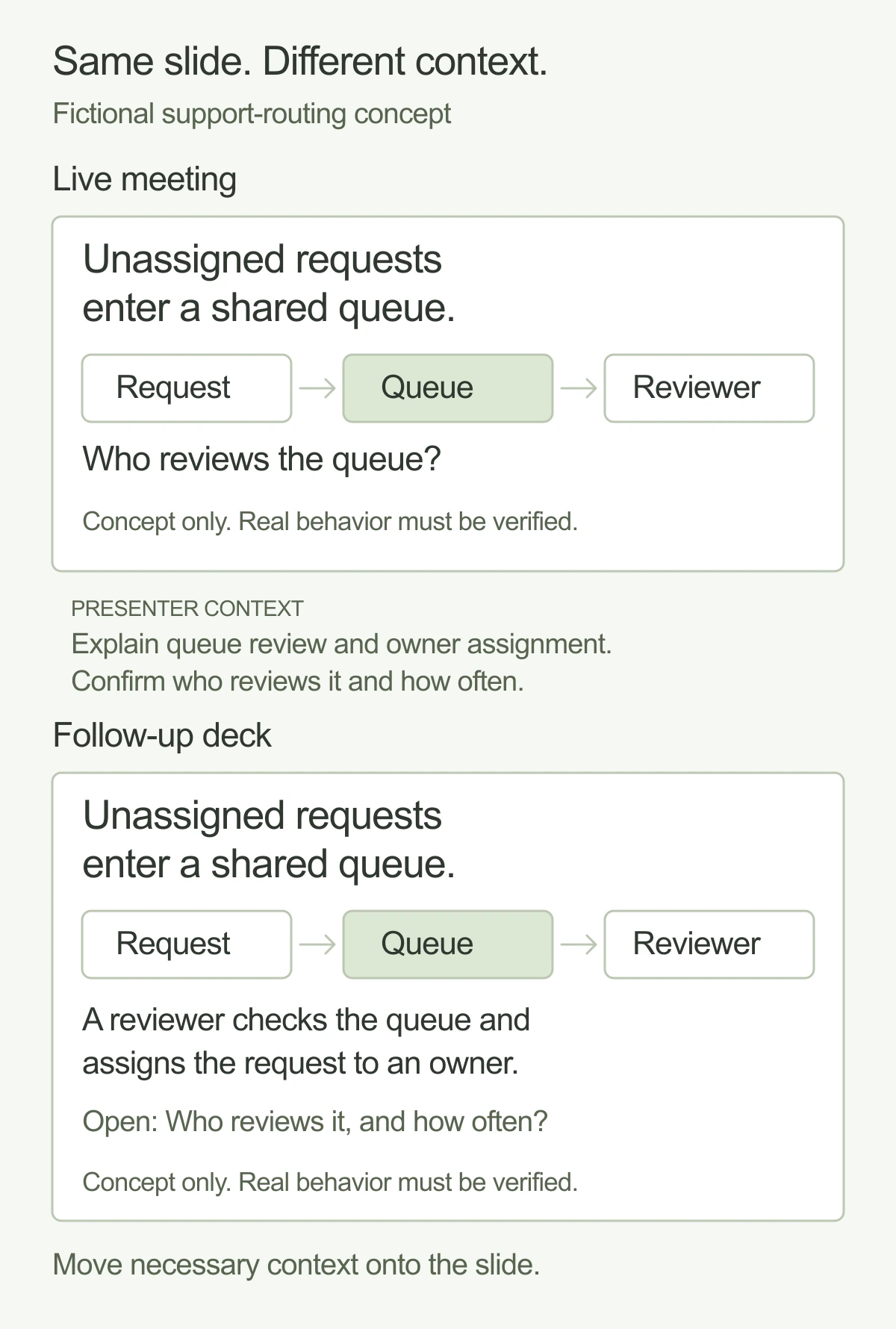
The follow-up adds the explanation that lived in presenter notes and keeps the unresolved question on the page. It makes no stronger product claim. If the extra context cannot fit legibly, use another slide or clearly connected supporting material. Keep the important qualification close to the claim in either format.
Give the design team approved inputs and ownership
Bring the content map, worked slide plans, and known uses to the design team. Identify which words are approved, which visuals show actual behavior, and which questions still need an answer. Provide the source for any data or quotation and confirm permission to use it.
Agree who owns the master content, which versions the team needs, and who checks product accuracy before release. Name update triggers such as a change in the workflow, an outdated product image, or a revised offer. A later edit should keep the headline, visual, evidence, and qualifications consistent.
For the wider assignment, use a creative brief to capture the audience, scope, and responsibilities. Once a draft exists, our guide to giving design feedback can help reviewers point to an issue and record the decision they need. The slide worksheet handles the message for a particular part of the deck; those guides cover the surrounding work.
Choose a next step the deck can support
Return to the decision you named at the start. In the fictional example, a useful next step could be a workflow review to define the queue reviewer and confirm the product behavior. State what would be checked and who needs to join.
Before handing over the deck, check that each important point has appropriate support or a clear limitation. Make sure the live and follow-up versions tell the same story, and that someone owns the next factual review. If you need a design team to shape the presentation alongside your marketing team, explore Spring’s creative services.
And good people.Meet Spring