
How long does a website redesign take?
Plan a launch around the content, decisions, build work, and checks it depends on. Use a dependency worksheet to make the schedule useful.
 Words by Spring Studio
TL;DR
- Scope and readiness determine the schedule; production time and elapsed calendar time are different.
- Connect each deliverable to its inputs, owner, review window, unresolved risks, and release gate.
- Phase a release only when the smaller scope creates a complete, usable experience.
A website redesign can span weeks or months. The useful estimate depends on scope, ready content, review time, build requirements, and launch checks. A page count alone cannot tell you the launch date: ten pages using one approved layout are a different assignment from ten pages with new content and custom interactions.
Separate time spent producing the site from elapsed calendar time. A page might take a short block of focused work but wait several days for product input or approval. Ask your design partner to show both kinds of time in the proposed website redesign timeline.
Agree what starts and finishes the schedule
Before accepting a date, ask what must be ready for the clock to start. Does kickoff assume an approved scope, access to the current site, a named reviewer, and usable copy? If those inputs are still being developed, include that work in the plan.
Define launch just as carefully. Is it approval of the visual design, completion of the build, or a tested website on your domain? An estimate for design files cannot be compared directly with a proposal that includes development, migration, forms, and handover.
Write the launch condition in plain language. For example: the agreed pages are approved, the site works on the chosen devices, the form reaches the right team, and the people responsible for publishing can make the agreed edits.
Map the work and the decisions it needs
Start with the page types and functions you need. Then record what each workstream depends on. Some tasks can overlap, while others need an approved input before they can be completed.
Swipe or scroll to compare the columns.
| Workstream | Work to finish | Input or decision needed first |
|---|---|---|
| Content | Approved page messages and usable assets | Audience, offer, page purpose, and subject-matter input |
| Design | Approved layouts and interaction states | Representative content and an agreed visual direction |
| Build | Working pages, CMS fields, and integrations | Agreed layouts, content structure, and technical requirements |
| Review | Resolved issues on representative pages and devices | A working build and people assigned to check it |
| Launch and handover | Approved release and an understood publishing workflow | Resolved release blockers, access, and an accountable release owner |
Your team can prepare a CMS content model while copy develops, or build an approved navigation while a later page is in review. Record the limits of that overlap. Placeholder copy can help test a layout; it does not settle whether the final message fits.
Use the website redesign checklist to identify readiness gaps before estimating them. The schedule should show how those gaps will be resolved, rather than assume they have disappeared.
Make review time part of the plan
A review window needs an owner, a defined decision, and enough notice. “Feedback this week” leaves too much open. “Marketing consolidates feedback on the service-page direction after product confirms the claims” describes work someone can organize.
Ask whose input is necessary and who can approve the result. Several people may contribute, but the team still needs a way to resolve conflicting comments. Book the relevant reviewers before scheduling work that depends on their decision.
When an input is late, identify the tasks it affects. A delayed service-page claim might block that page while the team continues with an approved resource template. It might also affect the homepage if the same claim appears there. Update the dependency map before announcing that the entire project can keep its original date.
Work through a fictional launch dependency
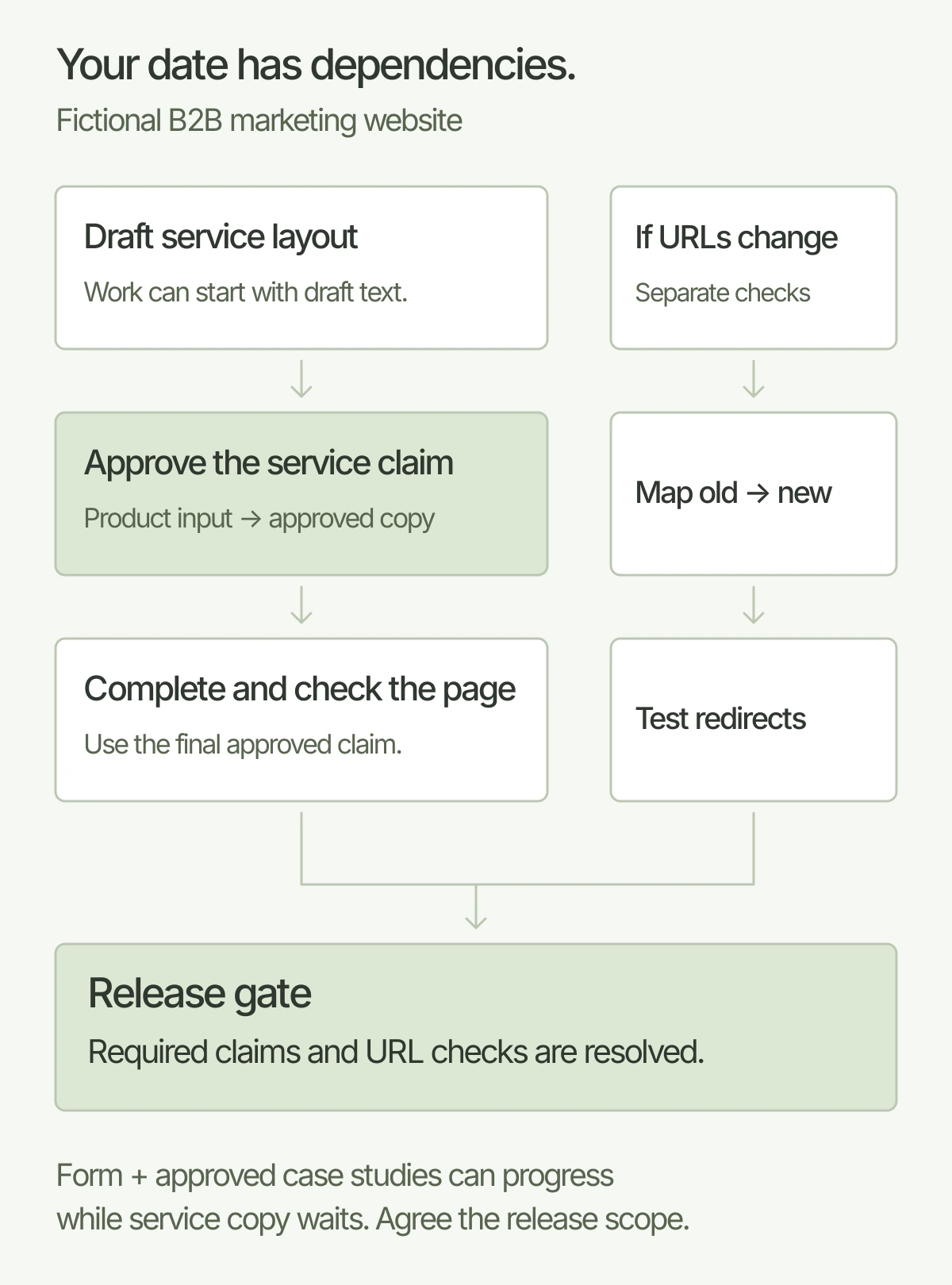
Consider a fictional B2B software company redesigning its marketing site. The launch scope includes a homepage, a service-page template, a contact form, and existing case studies. The company is also changing some URLs. Its product lead must approve a new service claim before that page is final.
The designer can test the service layout with draft text. The developer can connect the form and build an approved case-study template. Final service copy is still a dependency: it affects line lengths, supporting evidence, and the final review. Moving the build ahead does not turn draft copy into an approved release.
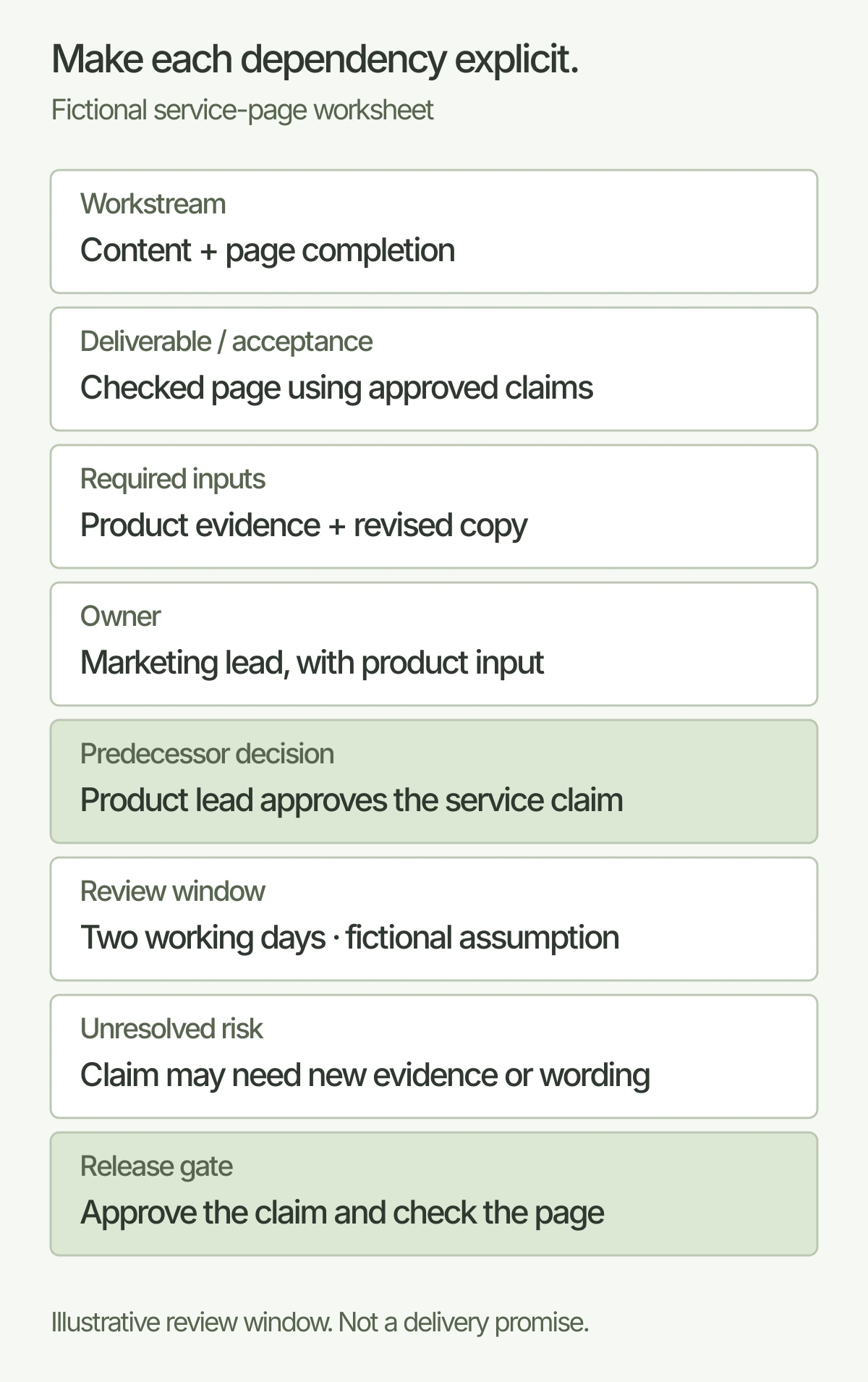
Here are two completed worksheet entries for that fictional situation. The review window is an agreed planning assumption, not an industry benchmark or a Spring delivery promise.
Service-page entry
Workstream: Content and page completion. Deliverable / acceptance condition: Service page using approved claims, checked in the finished layout. Required inputs: Product evidence and revised copy. Owner: Marketing lead, with product input. Predecessor decision: Product lead approves the service claim. Review window: Two working days reserved by this fictional team after the copy is ready. Unresolved risk: The claim may need different evidence or wording. Release gate: Product and marketing approve the final claim and the page is checked with that copy.
URL-change entry
Workstream: Migration. Deliverable / acceptance condition: Agreed old URLs point to appropriate new destinations and relevant links are checked. Required inputs: Current URL inventory and final URL list. Owner: Technical lead. Predecessor decision: Final page and URL scope. Review window: A separate pre-launch check with the release owner. Unresolved risk: An old page may have no agreed replacement. Release gate: The mapping is resolved and the redirects are tested before release.
A visual redesign does not automatically require URL changes. When URLs do change, allow work to map and test them and monitor the move afterward. Google's site-move guidance explains the relevant preparation. Search recrawling happens on its own schedule; it is not a production deadline your design team can guarantee.
Copy the website schedule worksheet
Use one entry for each deliverable with a meaningful dependency. Repeat it when different pages need different owners or approvals.
Website schedule dependency worksheet
Workstream: ____________________
Deliverable / acceptance condition: ____________________
Required inputs: ____________________
Owner: ____________________
Predecessor decision: ____________________
Review window: ____________________
Unresolved risk: ____________________
Release gate: ____________________
Download the schedule worksheet (.txt)
Decide whether to phase the release
A phased launch can help when a smaller complete site serves the immediate need. Specify what goes live, what remains on the current site, and what is postponed. Check navigation, links, content, and forms across that boundary.
For the fictional company, the new homepage and contact form might be ready before a larger resource-library rebuild. That is a possible release plan only if the remaining pages still work, the required claim is approved wherever it appears, and the team accepts the temporary experience. An unresolved core message may be a launch blocker rather than a sensible phase-two task.
Give the later phase its own owner, scope, and dependencies. Otherwise “phase two” can become a list of unfinished work without a credible next step.
Ask for a schedule you can manage together
Before accepting a website redesign schedule, ask:
- What inputs must we supply before the proposed start?
- Which page types, functions, migration tasks, and checks are included?
- Which decisions can overlap with production, and which block it?
- Who reviews each stage, and what review time have we reserved?
- What changes the date, and how will we see that change?
- What must pass before launch, and who owns the first updates afterward?
Bring your intended launch date and the reason behind it to the website design conversation. A useful plan connects that date to the actual work, the people doing it, and the decisions your team needs to make.
And good people.Meet Spring